13. Tree and List Widgets
A Gtk.TreeView and its associated widgets are an extremely powerful way
of displaying data. They are used in conjunction with a Gtk.ListStore
or Gtk.TreeStore and provide a way of displaying and manipulating data
in many ways, including:
Automatic updates when data is added, removed or edited
Drag and drop support
Sorting data
Embedding widgets such as check boxes, progress bars, etc.
Reorderable and resizable columns
Filtering data
With the power and flexibility of a Gtk.TreeView comes complexity. It
is often difficult for beginner developers to be able to utilize it correctly due
to the number of methods which are required.
13.1. The Model
Each Gtk.TreeView has an associated Gtk.TreeModel, which
contains the data displayed by the TreeView. Each Gtk.TreeModel can be
used by more than one Gtk.TreeView. For instance, this allows the same
underlying data to be displayed and edited in 2 different ways at the same time.
Or the 2 Views might display different columns from the same Model data, in the
same way that 2 SQL queries (or “views”) might show different fields from the
same database table.
Although you can theoretically implement your own Model, you will normally use
either the Gtk.ListStore or Gtk.TreeStore model classes.
Gtk.ListStore contains simple rows of data, and each row has no children,
whereas Gtk.TreeStore contains rows of data, and each row may have child
rows.
When constructing a model you have to specify the data types for each column the model holds.
store = Gtk.ListStore(str, str, float)
This creates a list store with three columns, two string columns, and a float column.
Adding data to the model is done using Gtk.ListStore.append() or
Gtk.TreeStore.append(), depending upon which sort of model was created.
For a Gtk.ListStore:
treeiter = store.append(["The Art of Computer Programming",
                         "Donald E. Knuth", 25.46])
For a Gtk.TreeStore you must specify an existing row to append the new row to,
using a Gtk.TreeIter, or None for the top level of the tree:
treeiter = store.append(None, ["The Art of Computer Programming",
                               "Donald E. Knuth", 25.46])
Both methods return a Gtk.TreeIter instance, which points to the location
of the newly inserted row. You can retrieve a Gtk.TreeIter by calling
Gtk.TreeModel.get_iter().
Once data has been inserted, you can retrieve or modify data using the tree iter and column index.
print(store[treeiter][2]) # Prints value of third column
store[treeiter][2] = 42.15
As with Python’s built-in list object you can use len() to get the number
of rows and use slices to retrieve or set values.
# Print number of rows
print(len(store))
# Print all but first column
print(store[treeiter][1:])
# Print last column
print(store[treeiter][-1])
# Set last two columns
store[treeiter][1:] = ["Donald Ervin Knuth", 41.99]
Iterating over all rows of a tree model is very simple as well.
for row in store:
    # Print values of all columns
    print(row[:])
Keep in mind, that if you use Gtk.TreeStore, the above code will only
iterate over the rows of the top level, but not the children of the nodes.
To iterate over all rows, use Gtk.TreeModel.foreach().
def print_row(store, treepath, treeiter):
    print("\t" * (treepath.get_depth() - 1), store[treeiter][:], sep="")

store.foreach(print_row)
Apart from accessing values stored in a Gtk.TreeModel with the list-like
method mentioned above, it is also possible to
either use Gtk.TreeIter or Gtk.TreePath instances. Both reference
a particular row in a tree model.
One can convert a path to an iterator by calling Gtk.TreeModel.get_iter().
As Gtk.ListStore contains only one level,
i.e. nodes do not have any child nodes, a path is essentially the index of the row
you want to access.
# Get path pointing to 6th row in list store
path = Gtk.TreePath(5)
treeiter = liststore.get_iter(path)
# Get value at 2nd column
value = liststore.get_value(treeiter, 1)
In the case of Gtk.TreeStore, a path is a list of indexes or a string.
The string form is a list of numbers separated by a colon. Each number refers to
the offset at that level. Thus, the path “0” refers to the root node and the
path “2:4” refers to the fifth child of the third node.
# Get path pointing to 5th child of 3rd row in tree store
path = Gtk.TreePath([2, 4])
treeiter = treestore.get_iter(path)
# Get value at 2nd column
value = treestore.get_value(treeiter, 1)
Instances of Gtk.TreePath can be accessed like lists, i.e.
len(treepath) returns the depth of the item treepath is pointing to,
and treepath[i] returns the child’s index on the i-th level.
13.2. The View
While there are several different models to choose from, there is only one view
widget to deal with. It works with either the list or the tree store. Setting up
a Gtk.TreeView is not a difficult matter. It needs a
Gtk.TreeModel to know where to retrieve its data from, either by
passing it to the Gtk.TreeView constructor, or by calling
Gtk.TreeView.set_model().
tree = Gtk.TreeView(model=store)
Once the Gtk.TreeView widget has a model, it will need to know how to
display the model. It does this with columns and cell renderers.
headers_visible controls whether
it displays column headers.
Cell renderers are used to draw the data in the tree model in a specific way.
There are a number of cell renderers that come with GTK+, for instance
Gtk.CellRendererText, Gtk.CellRendererPixbuf and
Gtk.CellRendererToggle.
In addition, it is relatively easy to write a custom renderer yourself by
subclassing a Gtk.CellRenderer, and adding properties with
GObject.Property().
A Gtk.TreeViewColumn is the object that Gtk.TreeView uses to
organize the vertical columns in the tree view and hold one or more cell renderers.
Each column may have a title that will
be visible if the Gtk.TreeView is showing column headers. The model
is mapped to the column by using keyword arguments with properties of the
renderer as the identifiers and indexes of the model columns as the arguments.
renderer = Gtk.CellRendererPixbuf()
column = Gtk.TreeViewColumn(cell_renderer=renderer, icon_name=3)
tree.append_column(column)
Positional arguments can be used for the column title and renderer.
renderer = Gtk.CellRendererText()
column = Gtk.TreeViewColumn("Title", renderer, text=0, weight=1)
tree.append_column(column)
To render more than one model column in a view column, you need to create a
Gtk.TreeViewColumn instance and use Gtk.TreeViewColumn.pack_start()
to add the model columns to it.
column = Gtk.TreeViewColumn("Title and Author")

title = Gtk.CellRendererText()
author = Gtk.CellRendererText()

column.pack_start(title, True)
column.pack_start(author, True)

column.add_attribute(title, "text", 0)
column.add_attribute(author, "text", 1)

tree.append_column(column)
13.3. The Selection
Most applications will need to not only deal with displaying data, but also receiving input events from users. To do this, simply get a reference to a selection object and connect to the “changed” signal.
select = tree.get_selection()
select.connect("changed", on_tree_selection_changed)
Then to retrieve data for the row selected:
def on_tree_selection_changed(selection):
    model, treeiter = selection.get_selected()
    if treeiter is not None:
        print("You selected", model[treeiter][0])
You can control what selections are allowed by calling
Gtk.TreeSelection.set_mode().
Gtk.TreeSelection.get_selected() does not work if the selection mode is
set to Gtk.SelectionMode.MULTIPLE, use
Gtk.TreeSelection.get_selected_rows() instead.
13.4. Sorting
Sorting is an important feature for tree views and is supported by the standard tree models (Gtk.TreeStore and Gtk.ListStore), which implement the Gtk.TreeSortable interface.
13.4.1. Sorting by clicking on columns
A column of a Gtk.TreeView can easily made sortable with a call to Gtk.TreeViewColumn.set_sort_column_id().
Afterwards the column can be sorted by clicking on its header.
First we need a simple Gtk.TreeView and a Gtk.ListStore as a model.
model = Gtk.ListStore(str)
model.append(["Benjamin"])
model.append(["Charles"])
model.append(["alfred"])
model.append(["Alfred"])
model.append(["David"])
model.append(["charles"])
model.append(["david"])
model.append(["benjamin"])

treeView = Gtk.TreeView(model=model)

cellRenderer = Gtk.CellRendererText()
column = Gtk.TreeViewColumn("Title", renderer, text=0)
The next step is to enable sorting. Note that the column_id (0 in the example) refers to the column of the model and not to the TreeView’s column.
column.set_sort_column_id(0)
13.4.2. Setting a custom sort function
It is also possible to set a custom comparison function in order to change the sorting behaviour. As an example we will create a comparison function that sorts case-sensitive. In the example above the sorted list looked like:
alfred
Alfred
benjamin
Benjamin
charles
Charles
david
David
The case-sensitive sorted list will look like:
Alfred
Benjamin
Charles
David
alfred
benjamin
charles
david
First of all a comparison function is needed. This function gets two rows and has to return a negative integer if the first one should come before the second one, zero if they are equal and a positive integer if the second one should come before the first one.
def compare(model, row1, row2, user_data):
    sort_column, _ = model.get_sort_column_id()
    value1 = model.get_value(row1, sort_column)
    value2 = model.get_value(row2, sort_column)
    if value1 < value2:
        return -1
    elif value1 == value2:
        return 0
    else:
        return 1
Then the sort function has to be set by Gtk.TreeSortable.set_sort_func().
model.set_sort_func(0, compare, None)
13.5. Filtering
Unlike sorting, filtering is not handled by the two models we previously saw, but by the Gtk.TreeModelFilter class. This class, like Gtk.TreeStore and Gtk.ListStore, is a Gtk.TreeModel. It acts as a layer between the “real” model (a Gtk.TreeStore or a Gtk.ListStore), hiding some elements to the view. In practice, it supplies the Gtk.TreeView with a subset of the underlying model. Instances of Gtk.TreeModelFilter can be stacked one onto another, to use multiple filters on the same model (in the same way you’d use “AND” clauses in a SQL request). They can also be chained with Gtk.TreeModelSort instances.
You can create a new instance of a Gtk.TreeModelFilter and give it a model to filter, but the easiest way is to spawn it directly from the filtered model, using the Gtk.TreeModel.filter_new() method.
filter = model.filter_new()
In the same way the sorting function works, the Gtk.TreeModelFilter uses a “visibility” function, which, given a row from the underlying model, will return a boolean indicating if this row should be filtered out or not. It’s set by Gtk.TreeModelFilter.set_visible_func():
filter.set_visible_func(filter_func, data=None)
The alternative to a “visibility” function is to use a boolean column in the model to specify which rows to filter. Choose which column with Gtk.TreeModelFilter.set_visible_column().
Let’s look at a full example which uses the whole Gtk.ListStore - Gtk.TreeModelFilter - Gtk.TreeModelFilter - Gtk.TreeView stack.
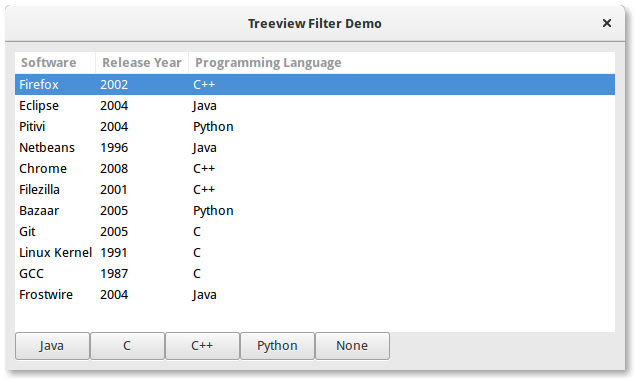
1 2 3 4 5 6 7 8 9 10 11 12 13 14 15 16 17 18 19 20 21 22 23 24 25 26 27 28 29 30 31 32 33 34 35 36 37 38 39 40 41 42 43 44 45 46 47 48 49 50 51 52 53 54 55 56 57 58 59 60 61 62 63 64 65 66 67 68 69 70 71 72 73 74 75 76 77 78 79 80 81 82 83 84 85 86 87 88 89 90 91 92 93 94 95 96 97 | import gi gi.require_version("Gtk", "3.0") from gi.repository import Gtk # list of tuples for each software, containing the software name, initial release, and main programming languages used software_list = [ ("Firefox", 2002, "C++"), ("Eclipse", 2004, "Java"), ("Pitivi", 2004, "Python"), ("Netbeans", 1996, "Java"), ("Chrome", 2008, "C++"), ("Filezilla", 2001, "C++"), ("Bazaar", 2005, "Python"), ("Git", 2005, "C"), ("Linux Kernel", 1991, "C"), ("GCC", 1987, "C"), ("Frostwire", 2004, "Java"), ] class TreeViewFilterWindow(Gtk.Window): def __init__(self): super().__init__(title="Treeview Filter Demo") self.set_border_width(10) # Setting up the self.grid in which the elements are to be positioned self.grid = Gtk.Grid() self.grid.set_column_homogeneous(True) self.grid.set_row_homogeneous(True) self.add(self.grid) # Creating the ListStore model self.software_liststore = Gtk.ListStore(str, int, str) for software_ref in software_list: self.software_liststore.append(list(software_ref)) self.current_filter_language = None # Creating the filter, feeding it with the liststore model self.language_filter = self.software_liststore.filter_new() # setting the filter function, note that we're not using the self.language_filter.set_visible_func(self.language_filter_func) # creating the treeview, making it use the filter as a model, and adding the columns self.treeview = Gtk.TreeView(model=self.language_filter) for i, column_title in enumerate( ["Software", "Release Year", "Programming Language"] ): renderer = Gtk.CellRendererText() column = Gtk.TreeViewColumn(column_title, renderer, text=i) self.treeview.append_column(column) # creating buttons to filter by programming language, and setting up their events self.buttons = list() for prog_language in ["Java", "C", "C++", "Python", "None"]: button = Gtk.Button(label=prog_language) self.buttons.append(button) button.connect("clicked", self.on_selection_button_clicked) # setting up the layout, putting the treeview in a scrollwindow, and the buttons in a row self.scrollable_treelist = Gtk.ScrolledWindow() self.scrollable_treelist.set_vexpand(True) self.grid.attach(self.scrollable_treelist, 0, 0, 8, 10) self.grid.attach_next_to( self.buttons[0], self.scrollable_treelist, Gtk.PositionType.BOTTOM, 1, 1 ) for i, button in enumerate(self.buttons[1:]): self.grid.attach_next_to( button, self.buttons[i], Gtk.PositionType.RIGHT, 1, 1 ) self.scrollable_treelist.add(self.treeview) self.show_all() def language_filter_func(self, model, iter, data): """Tests if the language in the row is the one in the filter""" if ( self.current_filter_language is None or self.current_filter_language == "None" ): return True else: return model[iter][2] == self.current_filter_language def on_selection_button_clicked(self, widget): """Called on any of the button clicks""" # we set the current language filter to the button's label self.current_filter_language = widget.get_label() print("%s language selected!" % self.current_filter_language) # we update the filter, which updates in turn the view self.language_filter.refilter() win = TreeViewFilterWindow() win.connect("destroy", Gtk.main_quit) win.show_all() Gtk.main() |