7. Label
Labels are the main method of placing non-editable text in windows, for instance
to place a title next to a Gtk.Entry widget. You can specify the text
in the constructor, or later with the Gtk.Label.set_text() or
Gtk.Label.set_markup() methods.
The width of the label will be adjusted automatically. You can produce multi-line labels by putting line breaks (”\n”) in the label string.
Labels can be made selectable with Gtk.Label.set_selectable().
Selectable labels allow the user to copy the label contents to the
clipboard. Only labels that contain useful-to-copy information —
such as error messages — should be made selectable.
The label text can be justified using the Gtk.Label.set_justify() method.
The widget is also capable of word-wrapping, which can be activated with
Gtk.Label.set_line_wrap().
Gtk.Label support some simple formatting, for instance allowing you to
make some text bold, colored, or larger. You can do this by providing a string
to Gtk.Label.set_markup(), using the
Pango Markup syntax [1].
For instance, <b>bold text</b> and <s>strikethrough text</s>.
In addition, Gtk.Label supports clickable hyperlinks.
The markup for links is borrowed from HTML, using the a with href and title
attributes. GTK+ renders links similar to the way they appear in web browsers,
with colored, underlined text. The title attribute is displayed as a tooltip
on the link.
label.set_markup("Go to <a href=\"https://www.gtk.org\" "
                 "title=\"Our website\">GTK+ website</a> for more")
Labels may contain mnemonics. Mnemonics are underlined characters in the
label, used for keyboard navigation. Mnemonics are created by providing a
string with an underscore before the mnemonic character, such as “_File”,
to the functions Gtk.Label.new_with_mnemonic() or
Gtk.Label.set_text_with_mnemonic().
Mnemonics automatically activate any activatable widget the label is inside,
such as a Gtk.Button; if the label is not inside the mnemonic’s target
widget, you have to tell the label about the target using
Gtk.Label.set_mnemonic_widget().
7.1. Example
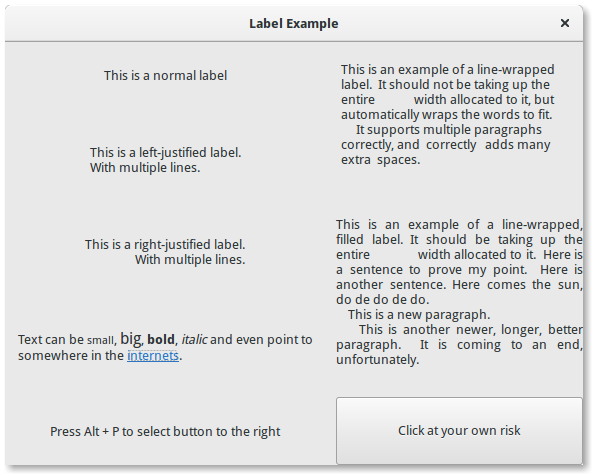
 1import gi
 2
 3gi.require_version("Gtk", "3.0")
 4from gi.repository import Gtk
 5
 6
 7class LabelWindow(Gtk.Window):
 8    def __init__(self):
 9        super().__init__(title="Label Example")
10
11        hbox = Gtk.Box(spacing=10)
12        hbox.set_homogeneous(False)
13        vbox_left = Gtk.Box(orientation=Gtk.Orientation.VERTICAL, spacing=10)
14        vbox_left.set_homogeneous(False)
15        vbox_right = Gtk.Box(orientation=Gtk.Orientation.VERTICAL, spacing=10)
16        vbox_right.set_homogeneous(False)
17
18        hbox.pack_start(vbox_left, True, True, 0)
19        hbox.pack_start(vbox_right, True, True, 0)
20
21        label = Gtk.Label(label="This is a normal label")
22        vbox_left.pack_start(label, True, True, 0)
23
24        label = Gtk.Label()
25        label.set_text("This is a left-justified label.\nWith multiple lines.")
26        label.set_justify(Gtk.Justification.LEFT)
27        vbox_left.pack_start(label, True, True, 0)
28
29        label = Gtk.Label(
30            label="This is a right-justified label.\nWith multiple lines."
31        )
32        label.set_justify(Gtk.Justification.RIGHT)
33        vbox_left.pack_start(label, True, True, 0)
34
35        label = Gtk.Label(
36            label="This is an example of a line-wrapped label.  It "
37            "should not be taking up the entire             "
38            "width allocated to it, but automatically "
39            "wraps the words to fit.\n"
40            "     It supports multiple paragraphs correctly, "
41            "and  correctly   adds "
42            "many          extra  spaces. "
43        )
44        label.set_line_wrap(True)
45        label.set_max_width_chars(32)
46        vbox_right.pack_start(label, True, True, 0)
47
48        label = Gtk.Label(
49            label="This is an example of a line-wrapped, filled label. "
50            "It should be taking "
51            "up the entire              width allocated to it.  "
52            "Here is a sentence to prove "
53            "my point.  Here is another sentence. "
54            "Here comes the sun, do de do de do.\n"
55            "    This is a new paragraph.\n"
56            "    This is another newer, longer, better "
57            "paragraph.  It is coming to an end, "
58            "unfortunately."
59        )
60        label.set_line_wrap(True)
61        label.set_justify(Gtk.Justification.FILL)
62        label.set_max_width_chars(32)
63        vbox_right.pack_start(label, True, True, 0)
64
65        label = Gtk.Label()
66        label.set_markup(
67            "Text can be <small>small</small>, <big>big</big>, "
68            "<b>bold</b>, <i>italic</i> and even point to "
69            'somewhere in the <a href="https://www.gtk.org" '
70            'title="Click to find out more">internets</a>.'
71        )
72        label.set_line_wrap(True)
73        label.set_max_width_chars(48)
74        vbox_left.pack_start(label, True, True, 0)
75
76        label = Gtk.Label.new_with_mnemonic(
77            "_Press Alt + P to select button to the right"
78        )
79        vbox_left.pack_start(label, True, True, 0)
80        label.set_selectable(True)
81
82        button = Gtk.Button(label="Click at your own risk")
83        label.set_mnemonic_widget(button)
84        vbox_right.pack_start(button, True, True, 0)
85
86        self.add(hbox)
87
88
89window = LabelWindow()
90window.connect("destroy", Gtk.main_quit)
91window.show_all()
92Gtk.main()