21. Drag and Drop
Note
Versions of PyGObject < 3.0.3 contain a bug which does not allow drag and drop to function correctly. Therefore a version of PyGObject >= 3.0.3 is required for the following examples to work.
Setting up drag and drop between widgets consists of selecting a drag source
(the widget which the user starts the drag from) with the
Gtk.Widget.drag_source_set() method, selecting a drag destination (the
widget which the user drops onto) with the Gtk.Widget.drag_dest_set()
method and then handling the relevant signals on both widgets.
Instead of using Gtk.Widget.drag_source_set() and
Gtk.Widget.drag_dest_set() some specialised widgets require the use of
specific functions (such as Gtk.TreeView and Gtk.IconView).
A basic drag and drop only requires the source to connect to the “drag-data-get”
signal and the destination to connect to the “drag-data-received” signal. More
complex things such as specific drop areas and custom drag icons will require
you to connect to additional signals and interact with
the Gdk.DragContext object it supplies.
In order to transfer data between the source and destination, you must interact
with the Gtk.SelectionData variable supplied in the
“drag-data-get” and “drag-data-received”
signals using the Gtk.SelectionData get and set methods.
21.1. Target Entries
To allow the drag source and destination to know what data they are receiving and
sending, a common list of Gtk.TargetEntry's are required.
A Gtk.TargetEntry describes a piece of data that will be sent by the drag
source and received by the drag destination.
There are two ways of adding Gtk.TargetEntry's to a
source and destination. If the drag and drop is simple and each target entry is
of a different type, you can use the group of methods mentioned here.
If you require more than one type of data or wish to do more complex things with
the data, you will need to create the Gtk.TargetEntry's
using the Gtk.TargetEntry.new() method.
21.2. Drag Source Signals
Name |
When it is emitted |
Common Purpose |
|---|---|---|
drag-begin |
User starts a drag |
Set-up drag icon |
drag-data-get |
When drag data is requested by the destination |
Transfer drag data from source to destination |
drag-data-delete |
When a drag with the action Gdk.DragAction.MOVE is completed |
Delete data from the source to complete the ‘move’ |
drag-end |
When the drag is complete |
Undo anything done in drag-begin |
21.3. Drag Destination Signals
Name |
When it is emitted |
Common Purpose |
|---|---|---|
drag-motion |
Drag icon moves over a drop area |
Allow only certain areas to be dropped onto |
drag-drop |
Icon is dropped onto a drag area |
Allow only certain areas to be dropped onto |
drag-data-received |
When drag data is received by the destination |
Transfer drag data from source to destination |
21.4. Example
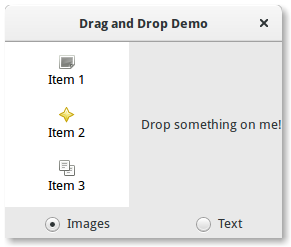
1 2 3 4 5 6 7 8 9 10 11 12 13 14 15 16 17 18 19 20 21 22 23 24 25 26 27 28 29 30 31 32 33 34 35 36 37 38 39 40 41 42 43 44 45 46 47 48 49 50 51 52 53 54 55 56 57 58 59 60 61 62 63 64 65 66 67 68 69 70 71 72 73 74 75 76 77 78 79 80 81 82 83 84 85 86 87 88 89 90 91 92 93 94 95 96 97 98 99 100 101 102 103 104 105 106 107 108 109 110 111 | import gi gi.require_version("Gtk", "3.0") from gi.repository import Gtk, Gdk, GdkPixbuf (TARGET_ENTRY_TEXT, TARGET_ENTRY_PIXBUF) = range(2) (COLUMN_TEXT, COLUMN_PIXBUF) = range(2) DRAG_ACTION = Gdk.DragAction.COPY class DragDropWindow(Gtk.Window): def __init__(self): super().__init__(title="Drag and Drop Demo") vbox = Gtk.Box(orientation=Gtk.Orientation.VERTICAL, spacing=6) self.add(vbox) hbox = Gtk.Box(spacing=12) vbox.pack_start(hbox, True, True, 0) self.iconview = DragSourceIconView() self.drop_area = DropArea() hbox.pack_start(self.iconview, True, True, 0) hbox.pack_start(self.drop_area, True, True, 0) button_box = Gtk.Box(spacing=6) vbox.pack_start(button_box, True, False, 0) image_button = Gtk.RadioButton.new_with_label_from_widget(None, "Images") image_button.connect("toggled", self.add_image_targets) button_box.pack_start(image_button, True, False, 0) text_button = Gtk.RadioButton.new_with_label_from_widget(image_button, "Text") text_button.connect("toggled", self.add_text_targets) button_box.pack_start(text_button, True, False, 0) self.add_image_targets() def add_image_targets(self, button=None): targets = Gtk.TargetList.new([]) targets.add_image_targets(TARGET_ENTRY_PIXBUF, True) self.drop_area.drag_dest_set_target_list(targets) self.iconview.drag_source_set_target_list(targets) def add_text_targets(self, button=None): self.drop_area.drag_dest_set_target_list(None) self.iconview.drag_source_set_target_list(None) self.drop_area.drag_dest_add_text_targets() self.iconview.drag_source_add_text_targets() class DragSourceIconView(Gtk.IconView): def __init__(self): Gtk.IconView.__init__(self) self.set_text_column(COLUMN_TEXT) self.set_pixbuf_column(COLUMN_PIXBUF) model = Gtk.ListStore(str, GdkPixbuf.Pixbuf) self.set_model(model) self.add_item("Item 1", "image-missing") self.add_item("Item 2", "help-about") self.add_item("Item 3", "edit-copy") self.enable_model_drag_source(Gdk.ModifierType.BUTTON1_MASK, [], DRAG_ACTION) self.connect("drag-data-get", self.on_drag_data_get) def on_drag_data_get(self, widget, drag_context, data, info, time): selected_path = self.get_selected_items()[0] selected_iter = self.get_model().get_iter(selected_path) if info == TARGET_ENTRY_TEXT: text = self.get_model().get_value(selected_iter, COLUMN_TEXT) data.set_text(text, -1) elif info == TARGET_ENTRY_PIXBUF: pixbuf = self.get_model().get_value(selected_iter, COLUMN_PIXBUF) data.set_pixbuf(pixbuf) def add_item(self, text, icon_name): pixbuf = Gtk.IconTheme.get_default().load_icon(icon_name, 16, 0) self.get_model().append([text, pixbuf]) class DropArea(Gtk.Label): def __init__(self): Gtk.Label.__init__(self) self.set_label("Drop something on me!") self.drag_dest_set(Gtk.DestDefaults.ALL, [], DRAG_ACTION) self.connect("drag-data-received", self.on_drag_data_received) def on_drag_data_received(self, widget, drag_context, x, y, data, info, time): if info == TARGET_ENTRY_TEXT: text = data.get_text() print("Received text: %s" % text) elif info == TARGET_ENTRY_PIXBUF: pixbuf = data.get_pixbuf() width = pixbuf.get_width() height = pixbuf.get_height() print("Received pixbuf with width %spx and height %spx" % (width, height)) win = DragDropWindow() win.connect("destroy", Gtk.main_quit) win.show_all() Gtk.main() |