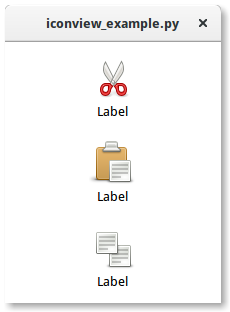
A Gtk.IconView is a widget that displays a collection of icons in a grid view. It supports features such as drag and drop, multiple selections and item reordering.
Similarly to Gtk.TreeView, Gtk.IconView uses a Gtk.ListStore for its model. Instead of using cell renderers, Gtk.IconView requires that one of the columns in its Gtk.ListStore contains GdkPixbuf.Pixbuf objects.
Gtk.IconView supports numerous selection modes to allow for either selecting multiple icons at a time, restricting selections to just one item or disallowing selecting items completely. To specify a selection mode, the Gtk.IconView.set_selection_mode() method is used with one of the Gtk.SelectionMode selection modes.
Creates a new Gtk.IconView widget using the specified area to layout cells inside the icons.
Creates a new Gtk.IconView widget with the model model.
Sets the model for a Gtk.IconView. If the Gtk.IconView already has a model set, it will remove it before setting the new model. If model is None, then it will unset the old model.
Returns the model the Gtk.IconView is based on. Returns None if the model is unset.
Sets the column with text to be column. The text column must be of type str.
Return the column with text, or -1 if it’s unset.
Sets the column with markup information for the Gtk.IconView to be column. The markup column must be of type str. If the markup column is set to something, it overrides the text column set by set_text_column().
Returns the column with markup text, or -1 if it’s unset.
Sets the column with pixbufs to be column. The pixbuf column must be of type GdkPixbuf.Pixbuf
Returns the column with pixbufs, or -1 if it’s unset.
Finds the path at the point(x, y), relative to bin_window coordinates. In contrast to get_path_at_pos(), this method also obtains the cell at the specified position. See convert_widget_to_bin_window_coords() for converting widget coordinates to bin_window coordinates.
Converts widget coordinates to coordinates for the bin_window, as expected by e.g. get_path_at_pos()
Sets the current keyboard focus to be at path, and selects it. This is useful when you want to focus the user’s attention on a particular item. If cell is not None, then focus is given to the cell specified by it. Additionally, if start_editing is True, then editing should be started in the specified cell.
This function is often followed by grab_focus() in order to give keyboard focus to the widget. Please note that editing can only happen when the widget is realized.
Returns the current cursor path and cell. If the cursor isn’t currently set, then path will be None. If no cell currently has focus, then cell will be None.
Calls a function for each selected icon. Note that the model or selection cannot be modified from within this method.
Sets the Gtk.SelectionMode of the Gtk.IconView.
Gets the Gtk.SelectionMode of the Gtk.IconView.
Sets the “item-orientation” property which determines whether the labels are drawn beside the icons instead of below.
Returns the Gtk.Orientation of the “item-orientation” property which determines whether the labels are drawn beside the icons instead of below.
Sets the “columns” property which determines in how many columns the icons are arranged. If columns is -1, the number of columns will be chosen automatically to fill the available area.
Returns the value of the “columns” property.
Sets the “item-width” property which specifies the width to use for each item. If it is set to -1, the icon view will automatically determine a suitable item size.
Returns the value of the “item-width” property.
Sets the “spacing” property which specifies the space which is inserted between the cells (i.e. the icon and the text) of an item.
Sets the “row-spacing” property which specifies the space which is inserted between the rows of the icon view.
Returns the value of the “row-spacing” property.
Sets the “column-spacing” property which specifies the space which is inserted between the columns of the icon view.
Returns the value of the “column-spacing” property.
Sets the “margin” property which specifies the space which is inserted at the top, bottom, left and right of the icon view.
Returns the value of the “margin” property.
Sets the “item-padding” property which specifies the padding around each of the icon view’s items.
Returns the value of the “item-padding property.
Selects the row at path.
Unselects the row at path.
Returns True if the icon pointed to by path is currently selected. If path does not point to a valid location, False is returned.
Creates a list of paths of all selected items. Additionally, if you are planning on modifying the model after calling this function, you may want to convert the returned list into a list of Gtk.TreeRowReference.
Selects all the icons. The Gtk.IconView must has its selection mode set to Gtk.SelectionMode.MULTIPLE
Unselects all the icons.
Moves the alignments of Gtk.IconView to the position specified by path. row_align determines where the row is placed, the col_align determines where column is placed. Both are expected to be between 0.0 and 1.0. 0.0 means left/top alignment, 1.0 means right/bottom alignment, 0.5 means center.
If use_align is False, the the alignment arguments are ignored, and the tree does the minimum amount of work to scroll the item onto the screen. This means that the item will be scrolled to the edge closest to its current position. If the item is currently visible on the screen, nothing is done.
This function only works if the model is set, and path is a valid row on the model. If the model changes before the Gtk.IconView is realized, the centered path will be modified to reflect this change.
Returns the first and last visible Gtk.TreePath. Note that there may be invisible paths in between.
Sets the tip area of tooltip to be the area covered by the item at path. See also set_tooltip_column() for a simpler alternative. See also Gtk.Tooltip.set_tip_area().
Sets the tip area of tooltip to the area which cell occupies in the item pointed to by path. See also Gtk.Tooltip.set_tip_area()
See also set_tooltip_column() for a simpler alternative.
This function is supposed to be used in a “query-tooltip” signal handler for Gtk.IconView. The x, y and keyboard_tip values which are received in the signal handler, should be passed to this method without modification.
The return value indicates whether there is an icon view item at the given coordinates (True) or not (False) for mouse tooltips. For keyboard tooltips the item returned will be the cursor item. When True, then all of the items which have been returned will be set to point to that row and corresponding model. x and y will always be converted to be relative to the Gtk.IconView‘s bin_window if keyboard_tooltip is False.
If you only plan to have simple (text-only) tooltips on full items, you can use this function to have Gtk.IconView handle these automatically for you. column should be set to the column in the Gtk.IconView‘s model containing the tooltip texts, or -1 to disable this feature.
When enabled, “has-tooltip” will be set to True and Gtk.IconView will connect a “query-tooltip” signal handler.
Note that the signal handler sets the text with Gtk.Tooltip.set_markup(), so &, <, etc have to be escaped in the text.
Returns the column of Gtk.IconView‘s model which is being used for displaying tooltips on Gtk.IconView‘s rows, or -1 if this is disabled.
Gets the row in which the item path is currently displayed. Row numbers start at 0.
Gets the column in which the item path is currently displayed. Column numbers start at 0.
Turns Gtk.IconView into a drag source for automatic DND. Calling this method sets “reorderable” to False.
Turns Gtk.IconView into a drop destination for automatic DND. Calling this method sets “reorderable” to False.
Undoes the effect of enable_model_drag_source(). Calling this method sets “reorderable” to False.
Undoes the effect of enable_model_drag_dest(). Calling this method sets “reorderable” to False.
This method is a convenience method to allow you to reorder models that support the Gtk.TreeDragSource and the Gtk.TreeDragDest interfaces. Both Gtk.TreeStore and Gtk.ListStore support these. If reorderable is True, then the user can reorder the model by dragging and dropping rows. The developer can listen to these changes by connecting the model’s “row_inserted” and “row_deleted” signals. The reordering is implemented by setting up the icon view as drag source and destination. Therefore, drag and drop can not be used in a reorderable view for any other purpose.
This function does not give you any degree of control over the order – any reordering is allowed. If more control is needed, you should probably handle drag and drop manually.
Retrieves whether the user can reorder the list via drag-and-drop. See set_reorderable().
Sets the item that is highlighted for feedback.
Gets information about the item that is highlighted for feedback.
Determines the destination item for a given position.
Creates a Cairo.Surface representation of the item at path. This image is used for a drag icon.
1 2 3 4 5 6 7 8 9 10 11 12 13 14 15 16 17 18 19 20 21 22 23 24 25 26 27 | from gi.repository import Gtk
from gi.repository.GdkPixbuf import Pixbuf
icons = ["gtk-cut", "gtk-paste", "gtk-copy"]
class IconViewWindow(Gtk.Window):
def __init__(self):
Gtk.Window.__init__(self)
self.set_default_size(200, 200)
liststore = Gtk.ListStore(Pixbuf, str)
iconview = Gtk.IconView.new()
iconview.set_model(liststore)
iconview.set_pixbuf_column(0)
iconview.set_text_column(1)
for icon in icons:
pixbuf = Gtk.IconTheme.get_default().load_icon(icon, 64, 0)
liststore.append([pixbuf, "Label"])
self.add(iconview)
win = IconViewWindow()
win.connect("delete-event", Gtk.main_quit)
win.show_all()
Gtk.main()
|