8. Entry
Entry widgets allow the user to enter text. You can change the contents with the
Gtk.Entry.set_text() method, and read the current contents with the
Gtk.Entry.get_text() method. You can also limit the number of characters
the Entry can take by calling Gtk.Entry.set_max_length().
Occasionally you might want to make an Entry widget read-only. This can be done
by passing False to the Gtk.Entry.set_editable() method.
Entry widgets can also be used to retrieve passwords from the user. It is common
practice to hide the characters typed into the entry to prevent revealing the
password to a third party. Calling Gtk.Entry.set_visibility() with
False will cause the text to be hidden.
Gtk.Entry has the ability to display progress or activity information
behind the text. This is similar to Gtk.ProgressBar widget and is
commonly found in web browsers to indicate how much of a page download has been
completed. To make an entry display such information, use
Gtk.Entry.set_progress_fraction(), Gtk.Entry.set_progress_pulse_step(),
or Gtk.Entry.progress_pulse().
Additionally, an Entry can show icons at either side of the entry. These icons
can be activatable by clicking, can be set up as drag source and can have tooltips.
To add an icon, use Gtk.Entry.set_icon_from_icon_name()
or one of the various other functions that set an icon from an icon name, a pixbuf,
or icon theme. To set a tooltip on an icon, use
Gtk.Entry.set_icon_tooltip_text() or the corresponding function for markup.
8.1. Example
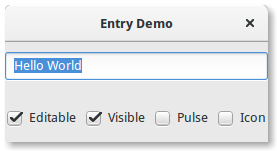
1 2 3 4 5 6 7 8 9 10 11 12 13 14 15 16 17 18 19 20 21 22 23 24 25 26 27 28 29 30 31 32 33 34 35 36 37 38 39 40 41 42 43 44 45 46 47 48 49 50 51 52 53 54 55 56 57 58 59 60 61 62 63 64 65 66 67 68 69 70 71 72 73 74 75 76 77 78 | import gi gi.require_version("Gtk", "3.0") from gi.repository import Gtk, GLib class EntryWindow(Gtk.Window): def __init__(self): super().__init__(title="Entry Demo") self.set_size_request(200, 100) self.timeout_id = None vbox = Gtk.Box(orientation=Gtk.Orientation.VERTICAL, spacing=6) self.add(vbox) self.entry = Gtk.Entry() self.entry.set_text("Hello World") vbox.pack_start(self.entry, True, True, 0) hbox = Gtk.Box(spacing=6) vbox.pack_start(hbox, True, True, 0) self.check_editable = Gtk.CheckButton(label="Editable") self.check_editable.connect("toggled", self.on_editable_toggled) self.check_editable.set_active(True) hbox.pack_start(self.check_editable, True, True, 0) self.check_visible = Gtk.CheckButton(label="Visible") self.check_visible.connect("toggled", self.on_visible_toggled) self.check_visible.set_active(True) hbox.pack_start(self.check_visible, True, True, 0) self.pulse = Gtk.CheckButton(label="Pulse") self.pulse.connect("toggled", self.on_pulse_toggled) self.pulse.set_active(False) hbox.pack_start(self.pulse, True, True, 0) self.icon = Gtk.CheckButton(label="Icon") self.icon.connect("toggled", self.on_icon_toggled) self.icon.set_active(False) hbox.pack_start(self.icon, True, True, 0) def on_editable_toggled(self, button): value = button.get_active() self.entry.set_editable(value) def on_visible_toggled(self, button): value = button.get_active() self.entry.set_visibility(value) def on_pulse_toggled(self, button): if button.get_active(): self.entry.set_progress_pulse_step(0.2) # Call self.do_pulse every 100 ms self.timeout_id = GLib.timeout_add(100, self.do_pulse, None) else: # Don't call self.do_pulse anymore GLib.source_remove(self.timeout_id) self.timeout_id = None self.entry.set_progress_pulse_step(0) def do_pulse(self, user_data): self.entry.progress_pulse() return True def on_icon_toggled(self, button): if button.get_active(): icon_name = "system-search-symbolic" else: icon_name = None self.entry.set_icon_from_icon_name(Gtk.EntryIconPosition.PRIMARY, icon_name) win = EntryWindow() win.connect("destroy", Gtk.main_quit) win.show_all() Gtk.main() |