15. ComboBox
A Gtk.ComboBox allows for the selection of an item from a dropdown menu.
They are preferable to having many radio buttons on screen as they take up less
room. If appropriate, it can show extra information about each item, such as text,
a picture, a checkbox, or a progress bar.
Gtk.ComboBox is very similar to Gtk.TreeView, as both use the
model-view pattern; the list of valid choices is specified in the form of a tree
model, and the display of the choices can be adapted to the data in the model by
using cell renderers.
If the combo box contains a large number of items, it may be better to display
them in a grid rather than a list. This can be done by calling
Gtk.ComboBox.set_wrap_width().
A default value can be set by calling Gtk.ComboBox.set_active() with the index
of the desired value.
The Gtk.ComboBox widget usually
restricts the user to the available choices, but it can optionally have an
Gtk.Entry, allowing the user to enter arbitrary text if none of the
available choices are suitable. To do this, use one of the static methods
Gtk.ComboBox.new_with_entry() or Gtk.ComboBox.new_with_model_and_entry()
to create an Gtk.ComboBox instance.
For a simple list of textual choices, the model-view API of Gtk.ComboBox
can be a bit overwhelming. In this case, Gtk.ComboBoxText offers a simple
alternative. Both Gtk.ComboBox and Gtk.ComboBoxText can contain
an entry.
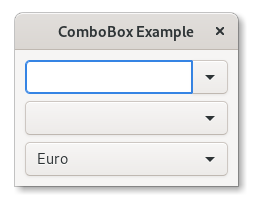
15.1. Example
1 2 3 4 5 6 7 8 9 10 11 12 13 14 15 16 17 18 19 20 21 22 23 24 25 26 27 28 29 30 31 32 33 34 35 36 37 38 39 40 41 42 43 44 45 46 47 48 49 50 51 52 53 54 55 56 57 58 59 60 61 62 63 64 65 66 67 68 69 70 71 72 73 74 75 76 77 78 79 80 81 82 83 84 85 86 87 88 89 90 91 92 93 94 95 96 | import gi gi.require_version("Gtk", "3.0") from gi.repository import Gtk class ComboBoxWindow(Gtk.Window): def __init__(self): super().__init__(title="ComboBox Example") self.set_border_width(10) name_store = Gtk.ListStore(int, str) name_store.append([1, "Billy Bob"]) name_store.append([11, "Billy Bob Junior"]) name_store.append([12, "Sue Bob"]) name_store.append([2, "Joey Jojo"]) name_store.append([3, "Rob McRoberts"]) name_store.append([31, "Xavier McRoberts"]) vbox = Gtk.Box(orientation=Gtk.Orientation.VERTICAL, spacing=6) name_combo = Gtk.ComboBox.new_with_model_and_entry(name_store) name_combo.connect("changed", self.on_name_combo_changed) name_combo.set_entry_text_column(1) vbox.pack_start(name_combo, False, False, 0) country_store = Gtk.ListStore(str) countries = [ "Austria", "Brazil", "Belgium", "France", "Germany", "Switzerland", "United Kingdom", "United States of America", "Uruguay", ] for country in countries: country_store.append([country]) country_combo = Gtk.ComboBox.new_with_model(country_store) country_combo.connect("changed", self.on_country_combo_changed) renderer_text = Gtk.CellRendererText() country_combo.pack_start(renderer_text, True) country_combo.add_attribute(renderer_text, "text", 0) vbox.pack_start(country_combo, False, False, True) currencies = [ "Euro", "US Dollars", "British Pound", "Japanese Yen", "Russian Ruble", "Mexican peso", "Swiss franc", ] currency_combo = Gtk.ComboBoxText() currency_combo.set_entry_text_column(0) currency_combo.connect("changed", self.on_currency_combo_changed) for currency in currencies: currency_combo.append_text(currency) currency_combo.set_active(0) vbox.pack_start(currency_combo, False, False, 0) self.add(vbox) def on_name_combo_changed(self, combo): tree_iter = combo.get_active_iter() if tree_iter is not None: model = combo.get_model() row_id, name = model[tree_iter][:2] print("Selected: ID=%d, name=%s" % (row_id, name)) else: entry = combo.get_child() print("Entered: %s" % entry.get_text()) def on_country_combo_changed(self, combo): tree_iter = combo.get_active_iter() if tree_iter is not None: model = combo.get_model() country = model[tree_iter][0] print("Selected: country=%s" % country) def on_currency_combo_changed(self, combo): text = combo.get_active_text() if text is not None: print("Selected: currency=%s" % text) win = ComboBoxWindow() win.connect("destroy", Gtk.main_quit) win.show_all() Gtk.main() |